Tuesday, July 29, 2014
Asynchronous webservice response.
Friday, June 29, 2012
New flavor to execute query from coldfusion cfscript.
Monday, June 25, 2012
Now Facebook session can be shared with our ColdFusion Applications
Yesterday I was trying to build one application which can share session with FaceBook. That means if I logged in FaceBook Then I don’t need to login in my application.
I know Facebook Platform is a set of APIs. SO i try to digg into FB and after a bit of research I find out it’s possible and ‘Benoit Hediard’ already build it in ColdFusion. That’s great !!!! .
SDK URL http://facebooksdk.riaforge.org/
To use facebook session in our application we need to create one APP id/Key in Facebook Development
https://developers.facebook.com/
By which we can also track how many users logged in
From where logged in.
What they are doing in our site.
…..
…..
…
and Many more.
I like it very much.
Tuesday, May 8, 2012
ColdFusion Closures By Zeus
ColdFusion 10 introduced a new feature called ‘ColdFusion Closures’.
A closure is an inner function. The inner function can access the variables in the outer function. You can access the inner function by accessing the outer function. See the example below.
function helloTranslator(String helloWord)
{
return function(String name) {
return “#helloWord#, #name#”;
};
}
helloInEnglish=helloTranslator(“Hello”);
helloInFrench=helloTranslator(“Bonjour”);
writeoutput(helloInEnglish (“Arindam”));
//closure is formed.
//Prints Hello, Arindam.
writeoutput(“<br>”);
writeoutput(helloInFrench(“Arindam”));
//Prints Bonjour, Arindam.
In the above example, the outer function returns a closure.
Using the helloInEnglish variable, the outer function is accessed. It sets the helloWord argument.
Using this function pointer, the closure is called. For example, helloInEnglish (“Arindam “).
Observe that even after the execution of outer function, the closure can access the variable sets by the outer function.
In this case, using closure, two new functions are created. One adds Hello to the name. And the second one adds Bonjour to the name.
helloInEnglish and helloInFrench are closures. Though they have the same function body they store different environments.
The inner function is available for execution after the outer function is returned.
A closure is formed when the inner function is available for execution. As seen in the example, even after the outer function is returned, the inner function can access the variables in the outer function.
Closure retains the reference to the environment at the time it is created. For example, the value of a local variable in the outer function. It makes closure an easy to use and handy feature.
Source: help.adobe.com/en_US/ColdFusion/10.0/Developing/index.html
Article written : Arindam Roy
Wednesday, April 4, 2012
Send Email with SSIS/DATABASE from gmail account
You had noticed That the Send Email task from the SSIS package does not have the option of indicating a user name and password, it will only authenticate using Windows Authentication.
This SSIS email task does not support Gmail SMTP server. Even it does not support any smtp server with username and password.
Here is one SSIS Script executor package example to send email from gmail account. This is a Substitute of SSIS email Send task.
Steps To Send Email with gmail.
Step1: Create Global variables for SMTP server Configurations.
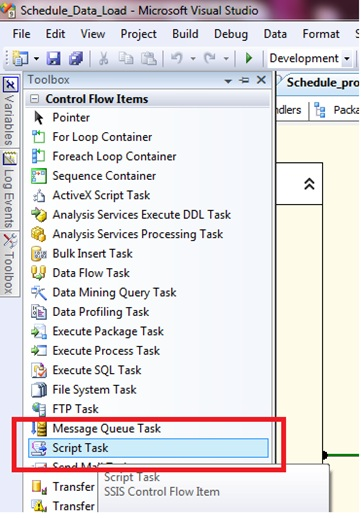
Step2: Drag and Drop Script Task
Step3: Add variables in ReadOnlyVariables
Step4: Click Edit to Write Script and Select Script Language “Microsoft Visual C# 2008”
So this will be our solution developing our own Send Email Function with option for User Credentials.
Now let’s start.
Step5: Write C# script to send email
Here the script to write:
using System;
using System.Data;
using Microsoft.SqlServer.Dts.Runtime;
using System.Windows.Forms;
using System.Text.RegularExpressions;
using System.Net.Mail;
namespace ST_f36d382ef89848a894adeac409e3a7f6.csproj
{
[System.AddIn.AddIn("ScriptMain", Version = "1.0", Publisher = "", Description = "")]
public partial class ScriptMain : Microsoft.SqlServer.Dts.Tasks.ScriptTask.VSTARTScriptObjectModelBase
{
#region VSTA generated code
enum ScriptResults
{
Success = Microsoft.SqlServer.Dts.Runtime.DTSExecResult.Success,
Failure = Microsoft.SqlServer.Dts.Runtime.DTSExecResult.Failure
};
#endregion
public void Main()
{
string sSubject = “[Kalyan]:SSIS Test Mail From Gmail”;
string sBody = “Test Message Sent Through SSIS”;
int iPriority = 2;
if (SendMail(sSubject, sBody, iPriority))
{
Dts.TaskResult = (int)ScriptResults.Success;
}
else
{
//Fails the Task
Dts.TaskResult = (int)ScriptResults.Failure;
}
}
public bool SendMail(string sSubject, string sMessage, int iPriority)
{
try
{
string sEmailServer = Dts.Variables["sEmailServer"].Value.ToString();
string sEmailPort = Dts.Variables["sEmailPort"].Value.ToString();
string sEmailUser = Dts.Variables["sEmailUser"].Value.ToString();
string sEmailPassword = Dts.Variables["sEmailPassword"].Value.ToString();
string sEmailSendTo = Dts.Variables["sEmailSendTo"].Value.ToString();
string sEmailSendCC = Dts.Variables["sEmailSendCC"].Value.ToString();
string sEmailSendFrom = Dts.Variables["sEmailSendFrom"].Value.ToString();
string sEmailSendFromName = Dts.Variables["sEmailSendFromName"].Value.ToString();
SmtpClient smtpClient = new SmtpClient();
MailMessage message = new MailMessage();
MailAddress fromAddress = new MailAddress(sEmailSendFrom, sEmailSendFromName);
//You can have multiple emails separated by ;
string[] sEmailTo = Regex.Split(sEmailSendTo, “;”);
string[] sEmailCC = Regex.Split(sEmailSendCC, “;”);
int sEmailServerSMTP = int.Parse(sEmailPort);
smtpClient.Host = sEmailServer;
smtpClient.Port = sEmailServerSMTP;
smtpClient.EnableSsl = true;
System.Net.NetworkCredential myCredentials =
new System.Net.NetworkCredential(sEmailUser, sEmailPassword);
smtpClient.Credentials = myCredentials;
message.From = fromAddress;
if (sEmailTo != null)
{
for (int i = 0; i < sEmailTo.Length; ++i)
{
if (sEmailTo[i] != null && sEmailTo[i] != “”)
{
message.To.Add(sEmailTo[i]);
}
}
}
if (sEmailCC != null)
{
for (int i = 0; i < sEmailCC.Length; ++i)
{
if (sEmailCC[i] != null && sEmailCC[i] != “”)
{
message.To.Add(sEmailCC[i]);
}
}
}
switch (iPriority)
{
case 1:
message.Priority = MailPriority.High;
break;
case 3:
message.Priority = MailPriority.Low;
break;
default:
message.Priority = MailPriority.Normal;
break;
}
message.Subject = sSubject;
message.IsBodyHtml = true;
message.Body = sMessage;
smtpClient.Send(message);
return true;
}
catch (Exception ex)
{
return false;
}
}
}
}
Tuesday, March 6, 2012
Keeping a session alive on ColdFusion using Jquery
Here is a simple solution to keep a session open on forms where users may need an extended period of time for data entry. You can include this code on any page where you need the session extended. You can remove the javascript include if JQuery is included on all of your pages already.
<!— Include this file on any page where users may take a long time filling in text and you want to keep the session open —>
<cfparam name=”variables.refreshrate” default=”60000″>
<cfoutput>
<script type=”text/javascript” src=”/js/jquery-1.3.2.min.js”></script>
<script language=”JavaScript” type=”text/javascript”>
$(document).ready(function(){
setTimeout(“callserver()”,#variables.refreshrate#);
});
function callserver()
{
var remoteURL = ‘/emptypage.cfm’;
$.get(remoteURL, function(data){
setTimeout(“callserver()”,#variables.refreshrate#);
});
}
</script>
</cfoutput>
In the above code the function callserver will get invoked 60 seconds after the data entry page is loaded. The callserver function will keep refreshing the data entry screen at an interval of 60 seconds with all the data that user have entered till the user submits the form.
Wednesday, February 22, 2012
Determine default and max session/Application timeouts for current ColdFusion server
ColdFusion provides Admin API to work with admin settings. For example setClientStorage, Cookie Management, Datasource Management etc. In one of my old post, I already provide an example how to add/update/delete a DSN from a code base.This API is mainly used to install/Build an application in one request.
In today’s post we determine how to get session and application scope values.
Usage Scenario: For example we have 3 applications in one ColdFusion server and we set different session timeout values for each application. Now if a developer wants to get sessionTimeOut and MaxSessionTimeOut values of each application.
<cftry>
<cfset adminAPI = createObject(“component”, “CFIDE.adminapi.administrator”)>
<cfset adminAPI.login(“password1$”)><!– Add password of CFadmin —>
<cfset runtimeENV = createObject(“component”, “CFIDE.adminapi.runtime”)>
<cfset sessionDefaultTimeout = runtimeENV.getScopeProperty(“sessionScopeTimeout”)>
<cfset sessionMaxTimeout = runtimeENV.getScopeProperty(“sessionScopeMaxTimeout”)>
<cfset ApplicationMaxTimeout = runtimeENV.getScopeProperty(“ApplicationscopeTimeout”)>
<cfoutput>
Default timeout session: #sessionDefaultTimeout# <br>Max value is #sessionMaxTimeout#.
<br>ApplicationMaxTimeout #ApplicationMaxTimeout#
</cfoutput>
<cfcatch>
<cfdump var=”#cfcatch#”/>
</cfcatch>
</cftry>
Note: This adminAPI will fall in CF8 if application name have space in Application.cfm/Application.cfc
Tuesday, January 10, 2012
Top 10 Key Information Technology Trends For 2012
Src:- http://www.techpark.net/2011/10/31/top-10-key-information-technology-trends-for-2012/
At the Gartner Symposium IT/Expo, David Cappuccio, managing vice president and chief of research for the Infrastructure teams with Gartner, said the Top 10 Trends show how IT is changing in that many of them in the past been outside the traditional purview of IT, but they will all affect how IT does its job in the future.
The Top 10 Trends and their impact, briefly include:
1 The evolution of virtualization: Cappuccio says virtualization will ultimately drive more companies to treat IT like a business. The danger during the next few years will be in following a specific vendor’s vision, though it is unlikely that any one vendor’s vision will prevail. Users should have their own visions of architecture control, and build toward it with a constantly updated strategic plan.
2 Big data, patterns and analytics: Unstructured data will grow some 80% over the course of the next five years, creating a huge IT challenge. Technologies such as in-line deduplication, automated tiering of data to get the most efficient usage patterns per kilowatt, and flash or solid-state drives for higher-end performance optimization, will increase in importance over the next few years, Cappuccio said. Analytics and other systems to monitor for recurring data patterns that could develop into money making applications will also be important.
3. Energy efficiency and monitoring: The power issue has moved up the food corporate food chain, Cappuccio said. Nascent tools are beginning to roll out that can use analytic tools to watch power usage on a variety of levels. With the increased attention given to power consumption, it has become apparent that many systems are highly underutilized. At low utilization levels, they use a high percentage of their total energy draw. An average x86 server that is turned on, but idle, will draw upward of 65% of its nameplate wattage, for example. IT organizations need a clear inventory of what compute resources are doing and what workloads there is the potential for significant waste of energy.
4. Context aware apps: The big question here how to do something smart to take advantage of smartphones. Gartner has in the past said context-based computing will go beyond the business intelligence applications and truly make a unified communications environment possible by bringing together data culled from social networks and mobile-devices.
5. Staff retention and retraining: Here the idea is developing a plan to get people excited about their jobs enough to stay. And we’ll need is as starting in 2011 an average of 10,000 baby boomers will be eligible to retire every day for the next 19 years, Cappuccio said. Loyalty to one company is not a quality found in new workers.
6. Social networks: Affordable and accessible technology has let individuals and communities come together in a new way – with a collective voice – to make statements about our organizations, the products/services we deliver and how we deliver them, Cappuccio said. The collective is made up of individuals, groups, communities, mobs, markets and firms that shape the direction of society and business. The collective is not new, but technology has made it more powerful -and enabled change to happen more rapidly Cappuccio said. The collective is just beginning to have an impact on business operations and strategies but most organizations do not have a plan for enabling or embracing it. Ignoring social networking is not an option, Cappuccio said.
7. Consumerization: The key trend here is the fact that new application types will be developed to address mobile users but they won’t be desktop replacement applications. Still, a secure, well-defined strategy needs to be put into place to take advantage of this development, Cappuccio said.
8. Compute per square foot: Virtualization is one of the most critical components being used to increase densities and vertically scale data centers. If used wisely, average server performance can move from today’s paltry 7% to 12% average to 40% to 50%, yielding huge benefits in floor space and energy savings. Two issues that need to be considered going forward are the number of cores per server – four- and eight-core systems are becoming common, and 16 cores will be common within two years - and overall data center energy trends. IT will also have to address things like performance/licensing, Cappuccio said
9. Cloud computing: While cost is a potential benefit for small companies, the biggest benefits of cloud computing are built-in elasticity and scalability. As certain IT functions industrialize and become less customized, such as email, there are more possibilities for larger organizations to benefit from cloud computing, according to Cappuccio.
10. Fabrics: Gartner defines this infrastructure convergence as: The vertical integration of server, storage, and network systems and components with element-level management software that lays the foundation to optimize shared data center resources efficiently and dynamically. Systems put forth so far by Cisco and HP will unify network control but are not there yet.
Monday, January 2, 2012
Executing Code When ColdFusion Server Starts
ColdFusion 9 introduced the onServerStart method into application framework in a new ColdFusion component, Server.cfc.
Having code run each time the server starts can be used for a variety of reasons but should be reserved for application independent tasks such as server wide logging.
ColdFusion 9 introduced the onServerStart method that, if implemented will run each time the server starts. The method is the only method in the new ColdFusion component Server.cfc. Unless an alternate location is specified in the ColdFusion administrator the ColdFusion server will look for Server.cfc in the webroot.
The following code will run when the server starts up and set a server wide variable that holds the data and time the server started.
With the addition of the onServerStart method applications can now handle server wide setup easily and efficiently.
Source: cookbooks.adobe.com
Friday, November 18, 2011
ADOBE CREATIVE CLOUD
The biggest announcement to come out of the annual Adobe MAX Conference last month was the unveiling of the Adobe Creative Cloud.
It is basically a membership-based program formed of three pillars: Creative Services, Creative Community, and Creative Applications.
The first is Creative Services, which are hosted services that you can use in your production work, in the delivery of your content.
This includes a font service like Typekit, which Adobe recently acquired, which enables the use and delivery of a broad foundry of cloud fonts across all of your work.
A second area is Digital Publishing, which enables publishing rich media to tablets via the cloud.
And the third category is Business Catalyst, which supports designing and operating websites for small businesses, with pre-built services for things like handling e-commerce, doing customer relationship management, and integrating with social networks.
The second pillar is Creative Community, which is for all creatives around the world and enables to connect more easily with other creatives – it’s a place to share, to communicate, and to inspire each other with your work and really collaborate as you’re working.
And lastly the third pillar is Creative Applications – and these are enabling you to create not only on personal computers, but also wherever you are with mobile devices, all connected through the Creative Cloud. This includes a whole new collection of Adobe touch apps to run on tablets and other mobile devices, including Proto, Kuler, Debut, Collage, Carousel, Ideas, and Photoshop Touch.
In addition, membership also includes access to all Adobe creative desktop products you know and love, including Photoshop, Illustrator, and Dreamweaver and Premiere and InDesign, Lightroom, more. You can download and install any of these applications you choose as part of your membership, and these are all connected to Creative Cloud via desktop sync. They also interact with the touch apps, and you can move files between desktop and touch as you’re working.
Source: http://prodesigntools.com/what-is-the-adobe-creative-cloud.html
Thursday, June 23, 2011
DDoS attacks in payment gateways
- The database should be on another host, which should be locked down with all current patches deployed and latest database software in use.
- The application should connect to the database using an encrypted link. If not, the application server and database server must reside in a restricted network with minimal other hosts.
- Do not deploy the database server in the main office network.
- The ColdFusion Administrator is the default interface for configuring the ColdFusion application server. It is secured by a single password. Ensure that the Administrator security is enabled and the password is strong and stored in a secure place.
- Ensure the checkbox is filled
- Enter and confirm a strong password string of 8 characters or more
- Click Submit Changes
The ColdFusion Sandbox allows you to place access security restrictions on files, directories, methods, and data sources. Sandboxes make the most sense for a hosting provider or corporate intranet where multiple applications share the same server. Enable this option.
D:\inetpub\wwwroot\ABC-apps\app1
Note: if a new sandbox is created for app2 then it will not inherit settings from ABC-apps.
Sandbox security configurations are application specific; however, there are general guidelines that should be followed:
Create a default restricted sandbox and copy setting to each subsequent sandbox removing restrictions as needed by the application. Except in the case of files/directories where access is granted rather than restricted.
RDS Password screen
Developers can access ColdFusion resources (files and data sources) over HTTP from Macromedia Dreamweaver MX and HomeSite+ through ColdFusion’s Remote Development Services (RDS). This feature is password protected should only be enabled in secure development environments.
Ensure the checkbox is filled
Sunday, May 29, 2011
SQL Tips: Faster technique to get 1st and last day of the month
Like following code:-
CREATE FUNCTION [dbo].[GetFirstDayOfMonth] ( @pInputDate DATETIME )
RETURNS DATETIME
BEGIN
RETURN CAST(CAST(YEAR(@pInputDate) AS VARCHAR(4)) + ‘/’ + CAST(MONTH(@pInputDate) AS VARCHAR(2)) + ‘/01′ AS DATETIME)
END
GO
In this function we need to separate month year from InputDate and then convert them into string.
This string conversion operation is time taking and consume good amount of memory as well.
I came up with a solution that easily return 1stdate of current moth.
This technique doesn’t need the conversion to string and back it to date therefore somewhat faster than normal technique:
SELECT DATEADD(month, DATEDIFF(month, ‘20010101′, getdate()), ‘20010101′) as firstDate(where ‘20010101′ is a randomly chosen date - most any date will work).For instance, to get the last day of the month we need to change only the second occurrence:
SELECT DATEADD( month, DATEDIFF(month, ‘20010101′, getdate()), ‘20010131′ ) as lastDate.
Wednesday, August 4, 2010
Creation of Singleton Object with Coldfusion
Note: Coldfusion in and out tag is replaced because of blogging problem)
Singletons are perhaps one of the most simple Design Patterns. For those who don’t know sigletons are a class that can only have one instance. They can be thought of as a glorified global variable - but are a lot more useful.Most ColdFusion classes, or rather instances of CF components, can be turned in a singleton by placing the following code in your Application.cfm:
cfif not structkeyexists(application,instance name)
cfset application.instance name = createobject(”component”,path to component)
/cfifor OnApplicationStart method of your Application.cfc: cfset application.instance name = createobject(”component”,path to component)
The above code places an instance of the component in the application scope and you can then access the properties and methods of the component via the application variable.Singletons can also be placed in other ColdFusion scopes such as the server or session scopes or even the request scope. Which scope you choose depends on what your code does.Another way to create a singleton is to add an getInstance method to your component and use that to return the instance.Like so:
cffunction name=”getInstance” access=”public” output=”false”
cfif not isdefined(”application.instance name”)
cfset application.[instance name] = this
/cfif
cfreturn application.[instance name]
/cffunctionRather than hard coding the instance name we can base it on the displayname of the component.cffunction name=”getInstance” access=”public” output=”false”
cfset var displayname = getMetaData(this).displayname
cfif not isdefined(”application.#displayname#”)
cfset application.[displayname] = this
/cfif
cfreturn application.[displayname]
/cffunction
While this is an improvement on the original code this method would need to be added to all components you wanted to turn into a singleton. A better solution is to create a singleton component and in a component you need to turn into a singleton extend from the singleton component.The singleton component (singleton.cfc):
cfcomponent displayname=”singleton”
cffunction name=”getInstance” access=”public” output=”false”
cfset var displayname = getMetaData(this).displayname
cfif not isdefined(”application.#displayname#”)
cfset application[displayname] = this
/cfif
cfreturn application[displayname]
/cffunction
/cfcomponentThe component we want to use as a singleton (dsn.cfc): cfcomponent displayname=”DSN” extends=”singleton”
cfset variables.DNS = “”
cffunction name=”getDSN” access=”public” returntype=”string” output=”false”
cfreturn variables.DSN
/cffunction
cffunction name=”setDSN” access=”public” output=”false”
cfargument name=”DSN” type=”string” required=”yes”
cfset variables.DSN = arguments.DSN
/cffunction
/cfcomponentUsing the component (in Applicaton.cfm): cfscript
if (not structkeyexists(application,’dsn’)) {
application.dsn = createobject(’component;,’dsn’).getInstance();
application.dsn.setDSN(’mydsn’);
}
/cfscriptor OnApplicationStart method of Application.cfc: cfscript
application.dsn = createobject(’component’,'dsn’).getInstance();
application.dsn.setDSN(’mydsn’);
/cfscriptIn the page: cfquery name=”myquery” datasource=”#applicaton.dsn.getDSN()#”
…
/cfquery Here the example code : singleton.cfc cfcomponent displayname=”singleton”
cffunction name=”init” access=”public” output=”false”
cfset var displayname = getMetaData(this).displayname
cfif not isdefined(”application._singletons”)
cfset application._singletons = structnew()
/cfif
cfif not isdefined(”application._singletons.#displayname#”)
cfset application._singletons[displayname] = this
/cfif
cfreturn application._singletons[displayname]
/cffunction
cffunction name=”remove” access=”public” output=”false”
cfset var displayname = getMetaData(this).displayname
cfif isdefined(”application._singletons.#displayname#”)
cfset structdelete(application._singletons, displayname)
/cfif
/cffunction
/cfcomponentAnd here hows it’s setup in Application.cfm (or .cfc): cfscript
// function to get an instance of a singleton
function getInstance(name) {
if (not isdefined(”application._singletons.#name#”)) {
instance = createobject(”component”,”com.classsoftware.utils.#name#”).init();
}
return application._singletons[name];
}
// function to remove a singleton
function removeInstance(name) {
if (isdefined(”application._singletons.#name#”)) {
application._singletons[name].remove();
}
}
// remove instance if asked
if (isdefined(”url.init”)) {
removeInstance(’dsn’);
}
/cfscriptAnd how it’s used on the page: cfset dsn = getInstance(”dsn”)
cfquery name=”myquery1″ datasource=”#dsn.getDSN()#”
select ….
/cfquery
cfquery name=”myquery2″ datasource=”#dsn.getDSN()#”
select ….
/cfquery
The functions getInstance and removeInstance could be placed inside a component that creates/removes singletons (a singleton factory?). However that component itself would need to be a singleton or you’d need to create it (via createobject) on every page. I’ll feel it’s best just to leave them as user defined functions for simplicity and performance sake.Anther issue that came up was that you can still use createobject (or cfinvoke) to create other instances of the component and there seems no way of stopping this.Well there’s one way I can think of but I’m not sure if I’d actually use it in a production system, but it may be of interest to someone so here’s how to do it.ColdFusion methods can be set at run time, you can add or replace methods by assigning them to new functions like so: // from this point on when method is called call newmethod instead
cfset instance.method = newmethodMethods can also be removed like so: // remove method “method” from instance
cfset structdelete(instance,”method”)
So you can create a component that has a method that throws an exception (via cfabort) and then have all methods of that component call that method. You can create an instance of the component but if you call any methods you will get an error.Applying this to our singleton component we get:
cfcomponent displayname=”singleton”
cffunction name=”init” access=”public” output=”false”
cfscript
var displayname = getMetaData(this).displayname;
this.invalid();
if (not isdefined(”application._singletons”)) {
application._singletons = structnew();
}
if (not isdefined(”application._singletons.#displayname#”)) {
application._singletons[displayname] = this;
}
return application._singletons[displayname];
/cfscript
/cffunction
cffunction name=”remove” access=”public” output=”false”
cfscript
var displayname = getMetaData(this).displayname;
this.invalid();
if (isdefined(”application._singletons.#displayname#”)) {
structdelete(application._singletons, displayname);
}
/cfscript
/cffunction
cffunction name=”invalid” access=”public” output=”false”
cfabort showerror=”Singletons must be created via helper functions not via create object!”
/cffunction
/cfcomponentThe this.invalid();
would also needed to be added to all methods of classes than extend singleton.cfc. eg dsn.cfc in the last article.If you then remove the method that generates the error (via structdelete) before any methods are called then the methods of the instance can be called.Applying this to our getInstance function we get: // function to get an instance of a singleton
function getInstance(name) {
if (not isdefined(”application._singletons.#name#”)) {
instance = createobject(”component”,”path..#name#”);
structdelete(instance,”invalid”);
instance.init();
}
return application._singletons[name];
}
That way only instances returned from our getInstance function can be used and any other instances created via created object (or other way) will throw an error when a method of that instance is called.
Singletons are perhaps one of the most simple Design Patterns. For those who don’t know sigletons are a class that can only have one instance. They can be thought of as a glorified global variable - but are a lot more useful.Most ColdFusion classes, or rather instances of CF components, can be turned in a singleton by placing the following code in your Application.cfm:
cfif not structkeyexists(application,instance name)
cfset application.instance name = createobject(”component”,path to component)
/cfifor OnApplicationStart method of your Application.cfc: cfset application.instance name = createobject(”component”,path to component)
The above code places an instance of the component in the application scope and you can then access the properties and methods of the component via the application variable.Singletons can also be placed in other ColdFusion scopes such as the server or session scopes or even the request scope. Which scope you choose depends on what your code does.Another way to create a singleton is to add an getInstance method to your component and use that to return the instance.Like so:
cffunction name=”getInstance” access=”public” output=”false”
cfif not isdefined(”application.instance name”)
cfset application.[instance name] = this
/cfif
cfreturn application.[instance name]
/cffunctionRather than hard coding the instance name we can base it on the displayname of the component.cffunction name=”getInstance” access=”public” output=”false”
cfset var displayname = getMetaData(this).displayname
cfif not isdefined(”application.#displayname#”)
cfset application.[displayname] = this
/cfif
cfreturn application.[displayname]
/cffunction
While this is an improvement on the original code this method would need to be added to all components you wanted to turn into a singleton. A better solution is to create a singleton component and in a component you need to turn into a singleton extend from the singleton component.The singleton component (singleton.cfc):
cfcomponent displayname=”singleton”
cffunction name=”getInstance” access=”public” output=”false”
cfset var displayname = getMetaData(this).displayname
cfif not isdefined(”application.#displayname#”)
cfset application[displayname] = this
/cfif
cfreturn application[displayname]
/cffunction
/cfcomponentThe component we want to use as a singleton (dsn.cfc): cfcomponent displayname=”DSN” extends=”singleton”
cfset variables.DNS = “”
cffunction name=”getDSN” access=”public” returntype=”string” output=”false”
cfreturn variables.DSN
/cffunction
cffunction name=”setDSN” access=”public” output=”false”
cfargument name=”DSN” type=”string” required=”yes”
cfset variables.DSN = arguments.DSN
/cffunction
/cfcomponentUsing the component (in Applicaton.cfm): cfscript
if (not structkeyexists(application,’dsn’)) {
application.dsn = createobject(’component;,’dsn’).getInstance();
application.dsn.setDSN(’mydsn’);
}
/cfscriptor OnApplicationStart method of Application.cfc: cfscript
application.dsn = createobject(’component’,'dsn’).getInstance();
application.dsn.setDSN(’mydsn’);
/cfscriptIn the page: cfquery name=”myquery” datasource=”#applicaton.dsn.getDSN()#”
…
/cfquery Here the example code : singleton.cfc
cfcomponent displayname=”singleton”
cffunction name=”init” access=”public” output=”false”
cfset var displayname = getMetaData(this).displayname
cfif not isdefined(”application._singletons”)
cfset application._singletons = structnew()
/cfif
cfif not isdefined(”application._singletons.#displayname#”)
cfset application._singletons[displayname] = this
/cfif
cfreturn application._singletons[displayname]
/cffunction
cffunction name=”remove” access=”public” output=”false”
cfset var displayname = getMetaData(this).displayname
cfif isdefined(”application._singletons.#displayname#”)
cfset structdelete(application._singletons, displayname)
/cfif
/cffunction
/cfcomponentAnd here hows it’s setup in Application.cfm (or .cfc): cfscript
// function to get an instance of a singleton
function getInstance(name) {
if (not isdefined(”application._singletons.#name#”)) {
instance = createobject(”component”,”com.classsoftware.utils.#name#”).init();
}
return application._singletons[name];
}
// function to remove a singleton
function removeInstance(name) {
if (isdefined(”application._singletons.#name#”)) {
application._singletons[name].remove();
}
}
// remove instance if asked
if (isdefined(”url.init”)) {
removeInstance(’dsn’);
}
/cfscriptAnd how it’s used on the page: cfset dsn = getInstance(”dsn”)
cfquery name=”myquery1″ datasource=”#dsn.getDSN()#”
select ….
/cfquery
cfquery name=”myquery2″ datasource=”#dsn.getDSN()#”
select ….
/cfquery
The functions getInstance and removeInstance could be placed inside a component that creates/removes singletons (a singleton factory?). However that component itself would need to be a singleton or you’d need to create it (via createobject) on every page. I’ll feel it’s best just to leave them as user defined functions for simplicity and performance sake.Anther issue that came up was that you can still use createobject (or cfinvoke) to create other instances of the component and there seems no way of stopping this.Well there’s one way I can think of but I’m not sure if I’d actually use it in a production system, but it may be of interest to someone so here’s how to do it.ColdFusion methods can be set at run time, you can add or replace methods by assigning them to new functions like so: // from this point on when method is called call newmethod instead
cfset instance.method = newmethodMethods can also be removed like so: // remove method “method” from instance
cfset structdelete(instance,”method”)So you can create a component that has a method that throws an exception (via cfabort) and then have all methods of that component call that method. You can create an instance of the component but if you call any methods you will get an error.Applying this to our singleton component we get: cfcomponent displayname=”singleton”
cffunction name=”init” access=”public” output=”false”
cfscript
var displayname = getMetaData(this).displayname;
this.invalid();
if (not isdefined(”application._singletons”)) {
application._singletons = structnew();
}
if (not isdefined(”application._singletons.#displayname#”)) {
application._singletons[displayname] = this;
}
return application._singletons[displayname];
/cfscript
/cffunction
cffunction name=”remove” access=”public” output=”false”
cfscript
var displayname = getMetaData(this).displayname;
this.invalid();
if (isdefined(”application._singletons.#displayname#”)) {
structdelete(application._singletons, displayname);
}
/cfscript
/cffunction
cffunction name=”invalid” access=”public” output=”false”
cfabort showerror=”Singletons must be created via helper functions not via create object!”
/cffunction
/cfcomponent
The this.invalid(); would also needed to be added to all methods of classes than extend singleton.cfc. eg dsn.cfc in the last article.If you then remove the method that generates the error (via structdelete) before any methods are called then the methods of the instance can be called.Applying this to our getInstance function we get:
// function to get an instance of a singleton
function getInstance(name) {
if (not isdefined(”application._singletons.#name#”)) {
instance = createobject(”component”,”path..#name#”);
structdelete(instance,”invalid”);
instance.init();
}
return application._singletons[name];
}
That way only instances returned from our getInstance function can be used and any other instances created via created object (or other way) will throw an error when a method of that instance is called.